Offline Is Not Enough: COLDCARD vs a Disconnected Phone
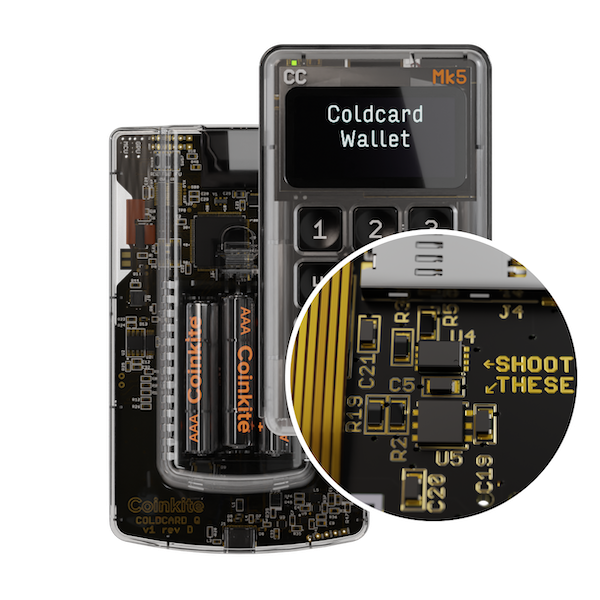
Pull the SIM. Wipe the phone. Delete every app except the wallet. Put it in a drawer and call it cold storage. You have improved a phone. You have not built a hardware wallet.
We built COLDCARD around a harsher assumption: the phone or laptop preparing a Bitcoin transaction may already be compromised. It can watch the blockchain, build a PSBT, and broadcast the result. It should not hold the savings key, and it should not get the final word on where your bitcoin goes.
Offline is a condition, not an architecture
Airplane mode is a menu setting. A missing SIM is an empty slot. Neither changes the machine underneath.
A clean phone still has a consumer operating system, image and document parsers, an update chain, application memory, Wi-Fi and Bluetooth hardware, USB, a baseband on cellular models, and millions of lines of code written for jobs that have nothing to do with Bitcoin. Deleting social apps removes obvious exposure. It does not turn that stack into a narrow signing appliance.
This is not a claim that every phone is infected. It is a claim about what must go right.
In 2023, Citizen Lab documented BLASTPASS, an iPhone exploit chain delivered through malicious PassKit images in iMessage. The victim did not need to click. A clean home screen would not have mattered.
Physical access changes the problem again. Ledger Donjon’s 2026 work on a MediaTek phone processor used electromagnetic fault injection to reach arbitrary code execution in the boot ROM’s highest privilege level. That research does not condemn every phone. It shows why consumer silicon should not be assumed to have the physical threat model of a signing device.
An offline laptop has the same category problem at a larger scale. The BeatCoin paper began with malware already present or introduced during installation or through removable media. The researchers then moved a 256-bit private key out of an air-gapped computer in seconds using electromagnetic, acoustic, optical, thermal, and other covert channels.
The hard part was not crossing the air gap. It was getting malicious code onto the machine that held the key. A general-purpose computer gives that code a full operating system, broad hardware, ordinary RAM, and many ways to observe or influence the wallet.
The usual clean-computer plan therefore depends on one machine doing three sensitive jobs correctly: store the secret, interpret untrusted transaction data, and tell the user what is about to be signed. Once that machine lies, there is no independent witness.
The phone is allowed to be compromised
COLDCARD separates those jobs.
The phone or desktop becomes a coordinator. It can hold a watch-only wallet, select UTXOs, calculate a fee, and build a Partially Signed Bitcoin Transaction. The COLDCARD receives the PSBT, derives the transaction details itself, asks for physical approval, and returns a signature. In the normal master-seed workflow, the coordinator never needs the seed or private key.
That is a useful security boundary because stealing bitcoin does not always require stealing a seed. Malware can replace a destination address, invent a change output, or present one transaction on the laptop while asking the signer to authorize another. Microsoft has documented clipboard-monitoring malware that substitutes cryptocurrency addresses. The computer can show you the address you intended while sending different bytes to the signer.
On COLDCARD, the screen is the line. The device derives and displays the destination, amount, change, and fee from the PSBT. If the laptop changes the transaction, the COLDCARD screen changes with it.
The control has a limit: you must read the screen. A trusted display does nothing for a user who confirms by reflex. For a significant payment, compare the full destination, confirm the amount, inspect change, and question a fee that does not match the coordinator.
Incoming bitcoin needs the same discipline. Malware can substitute a receive address before any signing happens. COLDCARD Q and supported COLDCARD models can derive and display wallet addresses independently. Verify a receive address on the signing device before sending a large balance to it. The watch-only wallet is useful; it is not the authority.
What we put behind that screen
A separate display matters only if the secret behind it is harder to reach than a phone app’s memory.
Current COLDCARD Q and COLDCARD Mk5 designs use secure elements from two different vendors: the Microchip ATECC608 family and the Maxim DS28C36B, alongside the main processor. The point is not that a secure-element logo makes extraction impossible. The point is that a single flaw in one storage component should not be enough to reconstruct the protected master secret.
Bitcoin-only firmware narrows the work the device must do. COLDCARD does not need an app store, browser, email client, cloud account, token parser, or support for dozens of unrelated chains. Less protocol scope means fewer code paths to review. It does not mean the remaining code has no bugs.
The firmware is public, releases are signed, and the repository documents a reproducible-build process that compares a local build with the released binary after accounting for the signature field. Open source lets people inspect code. Reproducibility gives advanced users a way to check that the release corresponds to that code. Neither helps if everyone assumes somebody else verified it forever.
At boot, COLDCARD checks the firmware and flash state. The Genuine and Caution indicators are connected through the secure-element path, and the PIN prefix produces device-specific anti-phishing words. A red Caution light or unfamiliar words mean stop. Do not enter the rest of the PIN to see what happens.
These layers address different failures. The secure elements raise the cost of physical extraction. Signed firmware constrains what the device will boot. Reproducible builds make the published binary checkable. Anti-phishing words and the indicators give the owner something observable. The PSBT screen catches a hostile coordinator. None of them deserves to be reduced to a sticker on the box.
An air gap should reduce trust, not create a myth
COLDCARD can sign without a live data cable. COLDCARD Q can move PSBTs by QR or MicroSD and run from AAA batteries. COLDCARD Mk5 supports MicroSD and NFC workflows, and USB communication can be disabled. Pick the transport that fits your threat model and the coordinator you use.
Removing the live USB session is valuable. It denies malware an always-on, bidirectional path for probing the signer and reacting to its responses. It also keeps signing separate from whatever USB stack and drivers happen to be running on the host.
But a QR code and a MicroSD file are still inputs. The signer must parse them. A malicious firmware update can still be malicious. A compromised signing implementation can leak data through the signatures it produces. Air gap removes a channel; it does not certify the code on either side.
That is why we do not ask users to trust the words “air-gapped.” Ledger Donjon once opened an air-gapped Ellipal and found a MediaTek design similar to a low-end phone, with debug paths and an interface that could be reconnected. Wi-Fi disabled in software was not the same thing as purpose-built key isolation.
Putting Android in a plastic case is still Android. Putting Linux on a desk with no Ethernet cable is still a general-purpose computer. The transport decision matters, but the boot chain, secret storage, parser, display, update path, and recovery workflow matter more.
SeedSigner is a more serious comparison. It is Bitcoin-only, built around QR exchange, and the recommended Raspberry Pi Zero 1.3 has no Wi-Fi or Bluetooth hardware. Its code and build process are public. Used as one cosigner in a well-designed multisig, it can add architectural diversity.
Its stateless model also has a cost. The seed is not absent; it is loaded again for each signing session, either as words or a plaintext-equivalent SeedQR, and held in ordinary RAM until power-off. The Pi boots its operating environment from a replaceable MicroSD card. The device-bound secure-boot tooling documented by Raspberry Pi applies to later hardware, not the recommended Pi Zero 1.3.
That creates a direct evil-maid path. Replace the boot card or image, wait for the owner to load the seed, and malicious code can observe the secret or alter signing behavior before the power is removed. Clearing RAM afterward does not undo exposure that occurred while the seed was present.
SeedSigner publishes image-verification guidance and says the normal workflow does not write the seed to MicroSD. Those are meaningful controls. They do not authenticate the boot media to the Pi at every use.
The workflow is also slow by design. The official setup tells users to allow about 45 seconds for the logo to appear, before loading the seed and reviewing a transaction. Friction is not a vulnerability, but repeated setup creates pressure to skip checks or repurpose the device for a simpler job.
The predictable operational risk is convenience drift. A device introduced as one key in 2-of-3 multisig ends up being used alone because single-signature custody is faster. In that setup, one substituted card plus one loaded seed can become a complete-loss event instead of one compromised cosigner.
We apply the same criticism to our own optional features. COLDCARD’s Temporary Seed documentation says plainly that holding another seed in RAM bypasses the normal secure-element model and is not recommended for regular handling of unencrypted seed material. “It disappears after power-off” is not the same security property as “it remained protected during use.”
A real attack is more useful than a perfect claim
Good security architecture should make partial compromise survivable. COLDCARD Mk4 received a hard public test in 2023 when Ledger Donjon researchers attacked the Maxim DS28C36 used as its second secure element.
Their FDTC paper used two laser faults and a statistical timing method to extract protected EEPROM pages with a reported 99% success rate. That is not a theoretical blemish. They broke the protection of one chip.
They did not recover the COLDCARD seed. The paper explains why: the relevant secret also depended on material associated with the other secure element and the main processor. The attacker had solved one part of a three-component problem.
That result is a better explanation of defense in depth than “our chip is secure.” Chips fail. Firmware gets bugs. Interfaces acquire parsers. The design should force an attacker to cross independent boundaries, and a device owner should still have a response when one layer is questioned.
We also need to be candid about malicious signer firmware. The Dark Skippy work showed how compromised firmware can encode a seed into public signatures and carry it across an air gap through the blockchain itself. COLDCARD’s controls here are deterministic signing behavior, signed firmware, public source, and reproducible builds—not an interactive host-nonce anti-exfiltration protocol. Users who never inspect firmware provenance are still trusting the update path.
The air gap did not stop the DS28C36 lab attack, and it would not stop malicious firmware from abusing signatures. The dual-chip architecture and verifiable software address those threats. This is why we describe COLDCARD as a system of controls, not as one magic feature.
Bad hardware wallets do not make phones good signers
There are bad hardware wallets. We have no interest in defending them.
A device should be rejected if it stores a savings key on an easily dumped general-purpose processor, trusts an unauthenticated operating-system image, cannot show the Bitcoin transaction independently, accepts unsigned firmware, or hides a phone platform behind an “air-gapped” label. A hardware wallet that cannot create a meaningful boundary is a hardware wallet in name only.
That does not erase the category. It makes product selection part of self-custody.
The fair comparison is not the worst gadget in a hardware-wallet database against a perfectly administered phone that never receives a bad update, never parses a hostile file, never leaks a seed from RAM, and always displays the right transaction. Compare two systems that can exist in the real world.
On one side is a patched, dedicated phone or computer whose large operating system still holds and uses the savings key. On the other is a Bitcoin-only signer with its own display, multi-chip secret protection, signed and reproducible firmware, observable boot checks, and a PSBT workflow designed around an untrusted host.
The phone may be the right place for spending money. It may be an excellent watch-only wallet. It may be the most convenient coordinator you own. Those are different jobs from holding the one key that can move your long-term savings.
The workflow we recommend
Buy a new COLDCARD from a source you trust. On first use, inspect the tamper-evident bag and confirm that its printed numbers match. The clear case, bag number, Genuine/Caution indicators, and PIN anti-phishing words are there to be checked, not admired.
Generate the master seed on the COLDCARD. Record the backup offline and protect it from theft, fire, water, and photography. Do a small receive-and-spend test. Then test the recovery process with disposable funds before the wallet holds an amount that would change your life.
Export a watch-only wallet to the coordinator. Let the phone or laptop monitor balances and build transactions. Move PSBTs by QR or MicroSD if you want no live data connection. Verify the destination, amount, change, and fee on the COLDCARD before signing. Verify receive addresses there before large deposits.
For life-changing value, consider 2-of-3 Bitcoin multisig with independent signer designs, separate locations, and a backed-up descriptor or wallet configuration. Three copies of the same device, seed, application, or setup process can preserve the same failure three times. Diversity matters only when it is real.
COLDCARD does not make backups safe, make users read screens, or make malicious firmware impossible. It gives those jobs a narrow machine built for Bitcoin instead of asking a phone or laptop to be everything at once.
Review the custody basics at BitcoinSecurity.org, then choose the COLDCARD Q or COLDCARD Mk5 workflow you can operate and recover correctly. Offline helps. A purpose-built signing boundary is what makes it useful.