COLDCARD Firmware 5.6.3 & 1.5.3Q: Codex32 and Shamir Backups
COLDCARD firmware 5.6.3 for Mk4/Mk5 and 1.5.3Q for Q let you split the wallet already on your device into Codex32 Shamir shares. No funds move, and the wallet does not change.
Codex32 is the main feature. The release also adds optional Seed Vault names for temporary seeds, PSBTv2 locktime support, and several signing and parsing fixes.
Codex32 and Shamir Secret Sharing
Codex32, defined by BIP-93, is a checksummed format for wallet secrets. It includes a Shamir secret-sharing scheme for manual backup and recovery.
A normal seed backup is all-or-nothing. Shamir sharing lets you make several shares and choose how many are needed for recovery. With a 2-of-3 set, any two shares recover the wallet and one share does not reveal its secret.
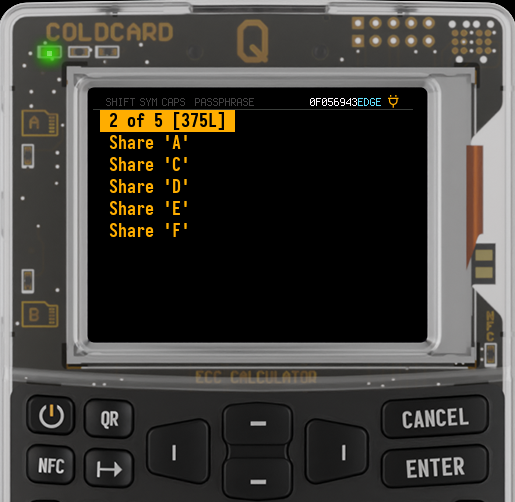
COLDCARD supports sets of two through nine shares, with a threshold from two through the total. You can:
- generate a 128- or 256-bit Codex32 wallet
- import a complete Codex32 secret
- split the active wallet with Shamir Split
- restore a wallet with Shamir Recover
- derive another share for an existing set
- calculate the checksum for a supported Codex32 header and payload
On a blank COLDCARD, generation, import, recovery, derivation, and checksum calculation are available from the new Codex32 menu. To split the active wallet, select:
Advanced/Tools > Danger Zone > Seed Functions > Shamir Split
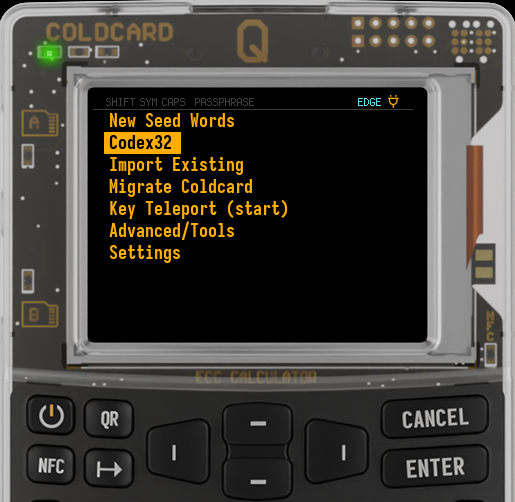
Calculate Checksum completes a Codex32 secret or share from its header and payload without importing a wallet. Mk4 and Mk5 shorten the menu label to Calc Checksum. The calculation uses exactly what you enter; it cannot find or repair an error already present in the text.
COLDCARD picks an encoding from the active wallet. MS1 holds raw BIP-32
master-seed bytes. CW1 holds the entropy behind English BIP-39 seed words.
CX1 holds extended private-key material, including an active passphrase
wallet. CW1 and CX1 are COLDCARD extensions, so recovery software must
support them explicitly.
Passphrases change what gets backed up. Splitting the original words wallet
creates CW1 shares. Recovery returns the words, and you apply the passphrase
again. Splitting while the passphrase wallet is active creates CX1 shares.
Those shares recover that wallet directly; they do not contain the original
words or passphrase.
COLDCARD does not keep a share set after a split. Record and compare every share before leaving the split screen. Splitting again creates a different set, so shares from separate splits cannot be mixed.
QR codes, NFC exports, and text files contain shares in plaintext. Keep fewer than the threshold in any one place. Before relying on the set, recover from the exact copies you plan to store and reproduce a known receive address. A matching fingerprint alone is not a complete recovery test.
The full Codex32 guide covers saved recovery sessions, passphrase examples, backup limits, and recovery testing. Source and review history are in Coldcard/firmware PR #819.
Seed Vault Names for Temporary Seeds
Temporary seeds normally appear at the top of the home menu as a fingerprint in square brackets. A new master-seed setting can replace that fingerprint with the matching Seed Vault label.
On Q, select:
Settings > Buried Settings > Temporary Seed Names > Use Names
On Mk4 and Mk5, the shorter menu label is used:
Settings > Buried Settings > Tmp Seed Names > Use Names
If the active temporary seed matches a Seed Vault entry named Travel, for
example, the home menu shows [Travel]. COLDCARD falls back to [XFP] when
the setting is disabled, no matching vault entry exists, or the label is too
wide to fit. Master-seed fingerprints continue to use angle brackets.
PSBTv2 Locktime and Parsing
PSBTv2 can put required block-height or timestamp locktimes on individual inputs. COLDCARD now derives the transaction-level locktime from those per-input requirements according to BIP-370.
When several inputs specify compatible requirements, the transaction uses the required maximum. A per-input requirement takes precedence over the global fallback locktime. If height-only and time-only requirements cannot be satisfied by one transaction locktime, COLDCARD rejects the PSBT instead of signing an inconsistent transaction.
The parser also rejects more malformed PSBTv2 files before signing:
- singleton global, input, and output fields carrying unexpected key data;
- non-canonical global input or output counts with trailing bytes; and
- PSBTv2 files that omit the required explicit global version.
Fixes and Hardening
- COLDCARD now warns before installing firmware signed by an external contributor or downgrading from the currently installed version.
- On Q, Ready To Sign and the Key Teleport retry screen now accept only the expected QR types. Scanning seed words or an extended private key there no longer risks replacing the master seed.
- Message-signing input supplied through NFC, QR, or a MicroSD
.jsonfile no longer crashes the device when the JSON contains a number, string, list, ornull. COLDCARD treats it as a plain-text request instead. Thanks to @Amiga500 for the report and fix. - After a failed signing attempt, COLDCARD clears the old output-verification state before checking outputs again.
- In Delta Mode, the device wipes before reading duress-wallet slot data.
How to Update
- Download firmware only from the official COLDCARD downloads page.
- Follow the instructions to verify the SHA-256 hash and PGP signature.
- Install it using the MicroSD upgrade procedure.
- After restarting, select Advanced > Upgrade > Show Version.
- Confirm that the device reports 5.6.3 on Mk4/Mk5 or 1.5.3Q on Q.
The complete source changes are available in the public COLDCARD firmware repository, including Codex32 source documentation, the 5.6.3 and 1.5.3Q release changelog, and the individual pull requests for temporary-seed names, message signing, PSBTv2 locktimes, and PSBTv2 parser hardening.
Need a COLDCARD for a tested recovery plan? Enjoy 10% off with on-chain
Bitcoin. Use code CKBTC at checkout.