BIP-322 Support, WIF Keys, and more!

New COLDCARD Feature Release: BIP-322 and WIF Support
Today we are releasing a new firmware version for COLDCARD. Tons of new features for both product families: Mk and Q!
New Features
BIP-322 Signing
COLDCARD can now sign BIP-322 “Proof of Reserve” PSBT files.
This requires a carefully crafted PSBT that does not represent a monetary transaction, but instead is demonstrating control over the keys for a list of UTXO, and also commits to a short text message. This BIP has been a long coming (assigned BIP number in 2018) but is truely a useful feature for proving you control UTXO and their keys in a comprehensive and secure way.
Read more about our implementation here. You will need a wallet or other tool to generate the specialzied PSBT needed to start.
See this X thread about how this might look!
WIF Store
This adds the ability to import foreign WIF keys (Wallet Import Format) and use them for PSBT signing.
Import private keys that you have in WIF format (base58, starts with L or K) via SD Card, Virtual Disk,
NFC, QR scanning or even—if you have the patience required—by directly entering all 50+ characters.
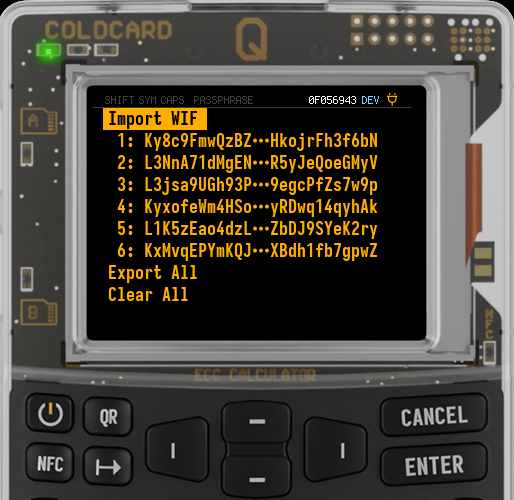
Once held in your “WIF Store”, any PSBT which calls for that key will be signed as needed. This process can be independant of your master seed (BIP-32 or BIP-39) wallet. Up to 30 keys can be held in the WIF store.
We can see this being useful for recovering paper wallets or cashing your OPENDIME, and perhaps some specialized emergencies. It will not be useful day to day.
Please be very careful when handling private keys!!
Export BIP-380 Extended Key Expression
Export BIP-380 extended key expressions.
Extended key expression are in the form [XFP/p/a/t/h]xpub and this is all you need to setup a multisig or
single signer wallet. We support common address derivations and their implied address types, plus you can specify
a custom path if needed.
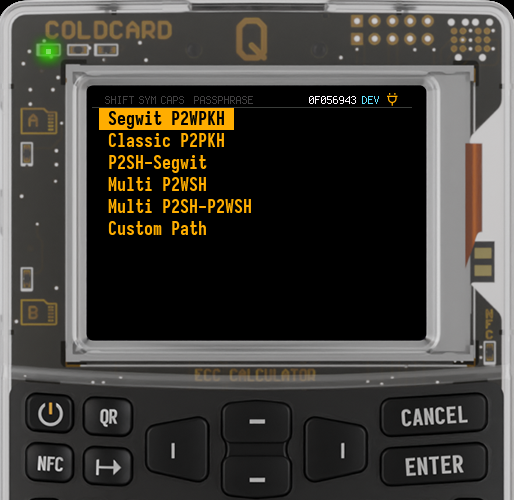
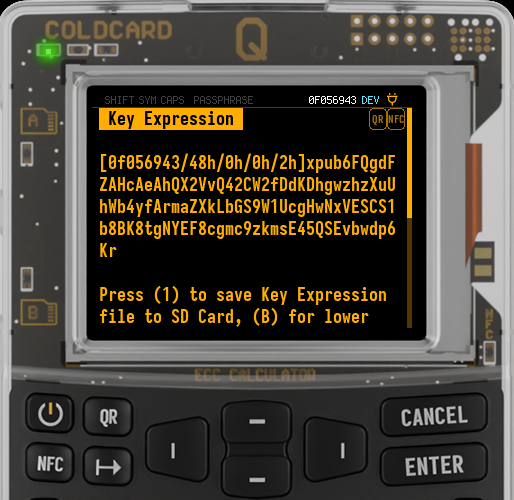
Navigate to “Advanced/Tools -> Export Wallet -> Key Expression” and follow the prompts to get started.
Transaction Input Explorer
Shows data about the UTXOs being spent. Press (2) before approving a transaction to enter the new Transaction Explorer. You can page through the UTXO that the proposed transaction will be spending. This is similar to our existing output explorer which allows you to verify the destination details, but in this case you are checking the coin control of your wallet.
Smaller Features and Enhancements
- Support for v3 transactions in PSBT files.
- Option to type a derived BIP-85 secret as an emulated USB keyboard.
- Nuke Device: purges all sensitive data and makes your COLDCARD e-waste.
- CCC debug menu allows you to reset block height.
- Show the BIP-39 passphrase on-screen (must scroll down) once new key is in effect.
- New “Buried Settings” menu, inside Settings menu, for rarely-applied settings.
- Add “Blue Wallet” option to “Export Wallet”
- Detect duplicated inputs in PSBT file.
- Bugfix: Replace
/with-in exported file names of multisig wallet export artifacts.
Mk Specific Changes: 5.5.0 - 2065-03-05
- Enhancement: Show QR of XOR-split seeds.
Q Specific Changes: 1.4.0Q - 2065-03-05
- Bugfix: Empty notes in hobbled mode caused yikes upon menu entry.
Video Tutorials
We have a growing library of video tutorials on Youtube … and we’re still adding more!